

Events
Learn how to create and manage different types of events in LetsGather.Creating Events
Events are the core of your booking system. You can create different types of events to match your business needs.Basic Event Setup
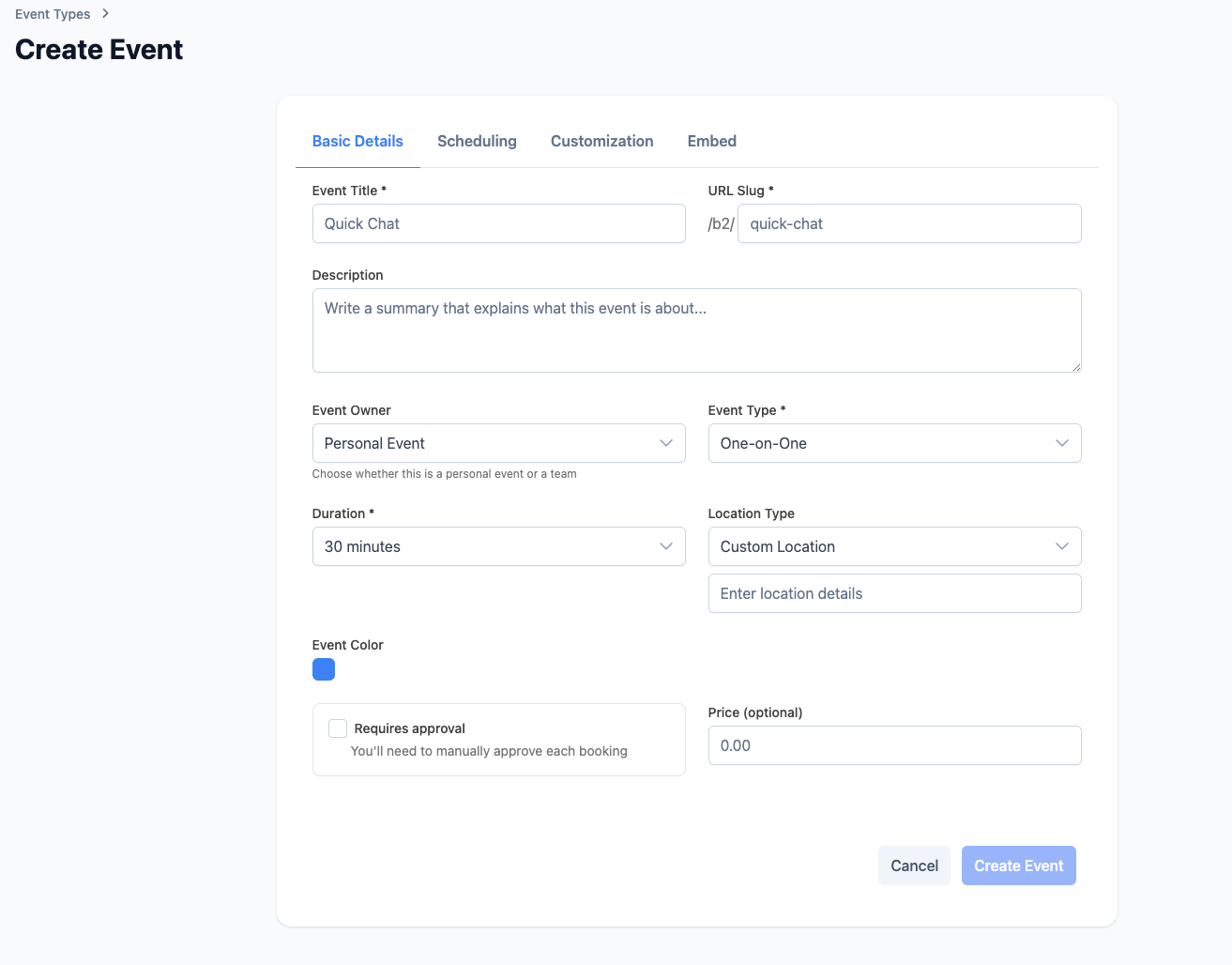
- Navigate to Events: Go to the Events section in your dashboard
- Click “Create Event”: Start the event creation process
- Fill in Details:
- Event name and description
- Duration (in minutes)
- Location (physical or virtual)
- Color coding for organization
Event Types
LetsGather supports four main event types, each designed for different use cases:One-on-One Events
Perfect for personal consultations, coaching sessions, or individual meetings. Use Cases:- Personal training sessions
- One-on-one coaching
- Individual consultations
- Private lessons
- Single attendee per booking
- Direct host-attendee interaction
- Flexible scheduling
- Personal notes and follow-up
Group Events
Ideal for workshops, classes, or meetings with multiple attendees. Use Cases:- Fitness classes
- Training workshops
- Group therapy sessions
- Team meetings
- Multiple attendees per session
- Group capacity management
- Shared experience for all participants
- Collective learning environment
Collective Events
Team-based events where multiple team members can host the same event type. Use Cases:- Customer support sessions
- Sales consultations
- Technical support
- Any team member can host
- Multiple team members available
- Shared event management
- Team collaboration
- Flexible host assignment
Round Robin Events
Distributes bookings evenly across team members to balance workload. Use Cases:- Sales calls distribution
- Support ticket assignment
- Consultation scheduling
- Workload balancing
- Automatic distribution
- Fair workload sharing
- Team member rotation
- Balanced booking allocation
Event Configuration
Configure your events with advanced settings:Basic Settings
- Event Name: Clear, descriptive title
- Description: Detailed information for attendees
- Duration: Time length in minutes
- Location: Physical address or virtual meeting link
- Color Coding: Visual organization
Advanced Settings
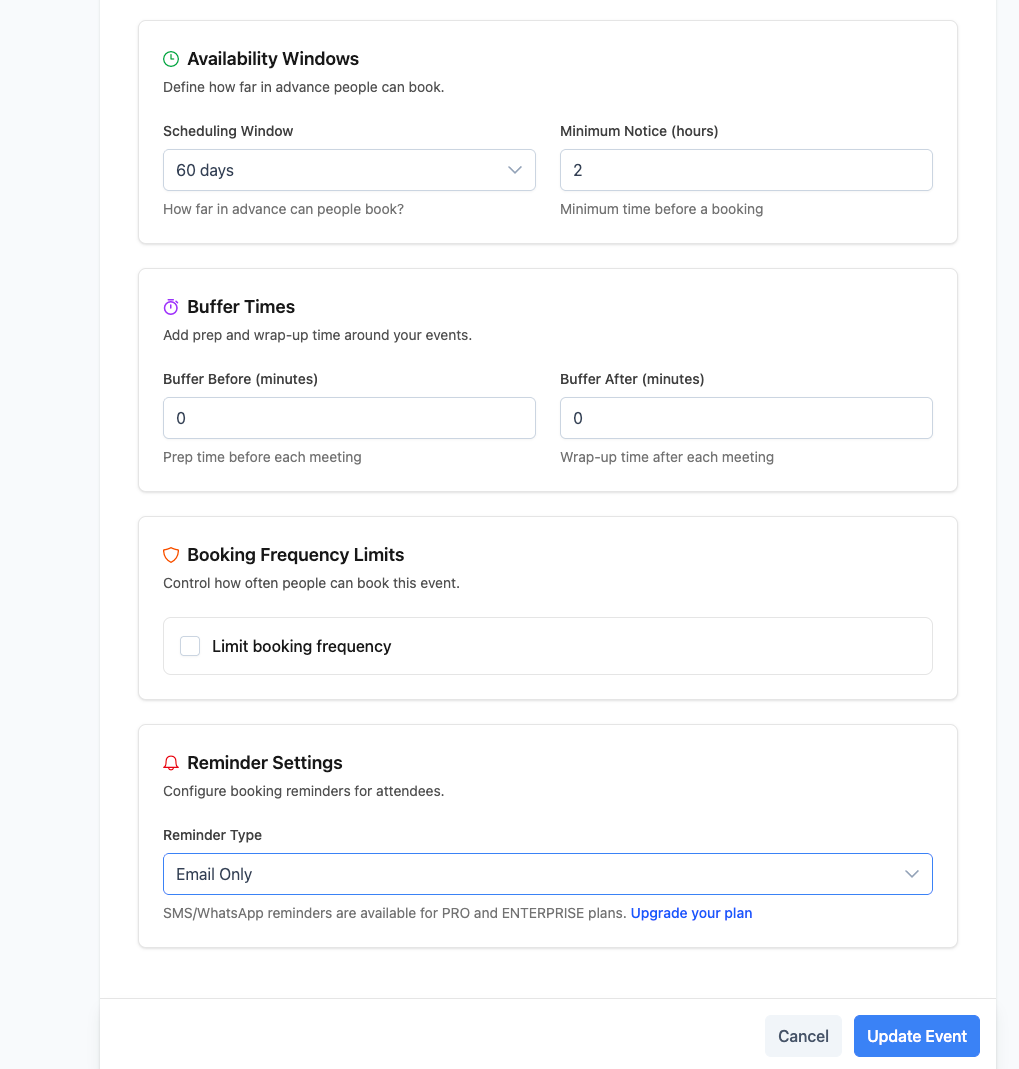
- Availability: Set your working hours and availability
- Buffer Time: Add time before and after events
- Booking Limits: Control how many bookings per day/week
- Approval Requirements: Require manual approval for bookings
- Pricing: Set prices for paid events
- Minimum Notice: Require advance booking time
- Scheduling Window: Limit how far in advance bookings can be made
Team Events
For team-based events, you can:- Select which team members can host
- Set team-specific availability
- Configure round-robin distribution
- Manage team permissions
Booking Rules
Configure how your events can be booked:- Buffers: Add time before/after meetings
- Daily limits: Cap the number of bookings per day
- Minimum notice: Require advance notice to book
- Start intervals: e.g., 15‑minute increments
- Booking windows: Limit how far in advance bookings can be made
Intake Questions
Add custom questions for guests to gather important information:- Contact Information: Name, email, phone
- Company Details: Company name, role, industry
- Meeting Preferences: Preferred communication method
- Custom Questions: Any specific information you need
Sharing Your Events
Once created, you can share your events in multiple ways:Direct Links
- Copy the booking link to share via email, social media, or messaging
- Links are automatically generated for each event
- Customizable URL slugs for branding
QR Codes
- Generate QR codes for easy mobile booking
- Perfect for physical locations and printed materials
- Downloadable in various formats
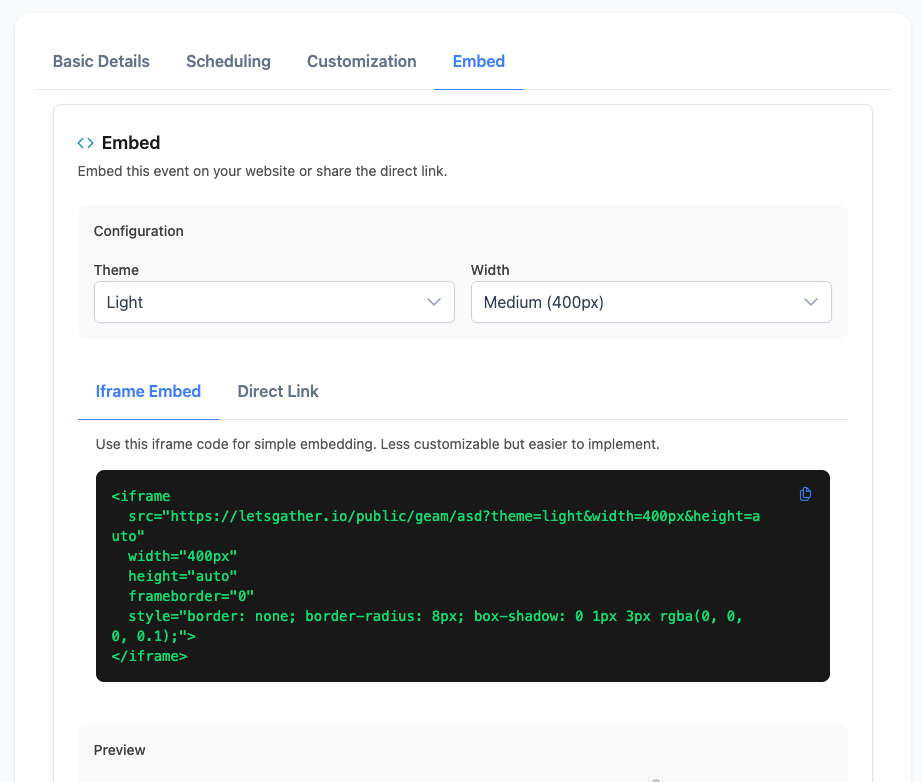
Embedding
- Embed booking widgets on your website
- Customize appearance to match your brand
- Responsive design for all devices
Managing Events
Event Status
- Active: Accepting new bookings
- Inactive: Temporarily disabled
- Archived: Historical events
Event Analytics
Track your event performance:- Total bookings
- Conversion rates
- Popular time slots
- Revenue tracking (for paid events)
- Team member performance (for team events)
Event Updates
- Edit event details anytime
- Update availability and pricing
- Modify booking requirements
- Archive completed events
- Duplicate events for similar offerings
Event Best Practices
Naming Conventions
- Use clear, descriptive names
- Include duration in the title
- Add location indicators
- Use consistent formatting
Description Guidelines
- Explain what attendees can expect
- Include preparation requirements
- Mention any prerequisites
- Add cancellation policies
Pricing Strategy
- Set competitive rates
- Consider package deals
- Offer early bird discounts
- Include clear refund policies